

Why add crew to voyages?
Capturing a voyage on SailTies is collaborative. Only one person needs create a voyage, then everyone aboard else can join to share photos, logs and keep track of their miles.
Who can be added as crew?
The easiest way to add crew is to invite SailTies users to your voyage. They will be notified and can join with a single tap.
You can also invite sailors who are not on SailTies or add their names manually if they do not want to join.
How to add crew to your voyages
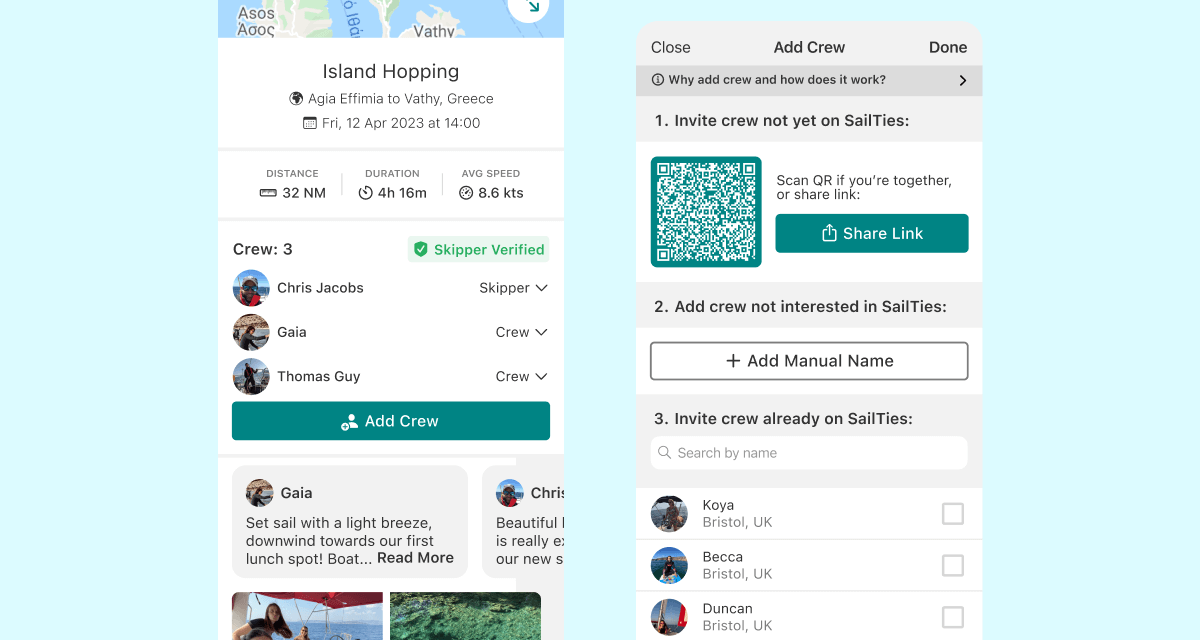
Open the voyage and tap the 'Add Crew' button. You will be presented with a list of options to add crew:
1. Invite crew not yet on SailTies
Get them to scan the QR code or send them a link to sign up and join the voyage.
2. Add crew not interested in SailTies
Tap the 'Add Name Manually' button to enter names of crew who do not want to join SailTies. You can also set their role to skipper to request a signature if needed. Read more on skipper signatures
3. Invite crew already on SailTies
Search by their name or select from sailors you follow. They will be sent an invite notification and will appear as 'Pending' until they join.
How to join someone else's voyage
If you are still together, scan the QR code on the 'Add Crew' screen on their phone. Otherwise, ask them to invite you.
You can also join a voyage by tapping the 'Join Crew' button on the voyage screen.
How to remove crew
If you recorded the voyage, you can remove crew by tapping the arrow next to their name and selecting 'Remove'.
How to leave a voyage
You can leave a voyage without deleting it for everyone else (even if you recorded it). Tap the arrow next to your name in the crew list and select 'Leave Voyage'.
Voyage Clashes
You cannot be crew on overlapping voyages. If you try to join a voyage that clashes with another, you will be asked to leave the other voyage first.